E-arquivo

Con Bilsoft E-Archive, puede crear sus facturas en entorno electrónico, almacenarlas de forma segura y gestionarlas fácilmente. Digitalice sus procesos de E-Archive para ahorrar tiempo y aumentar su eficiencia operativa.

Llámenos
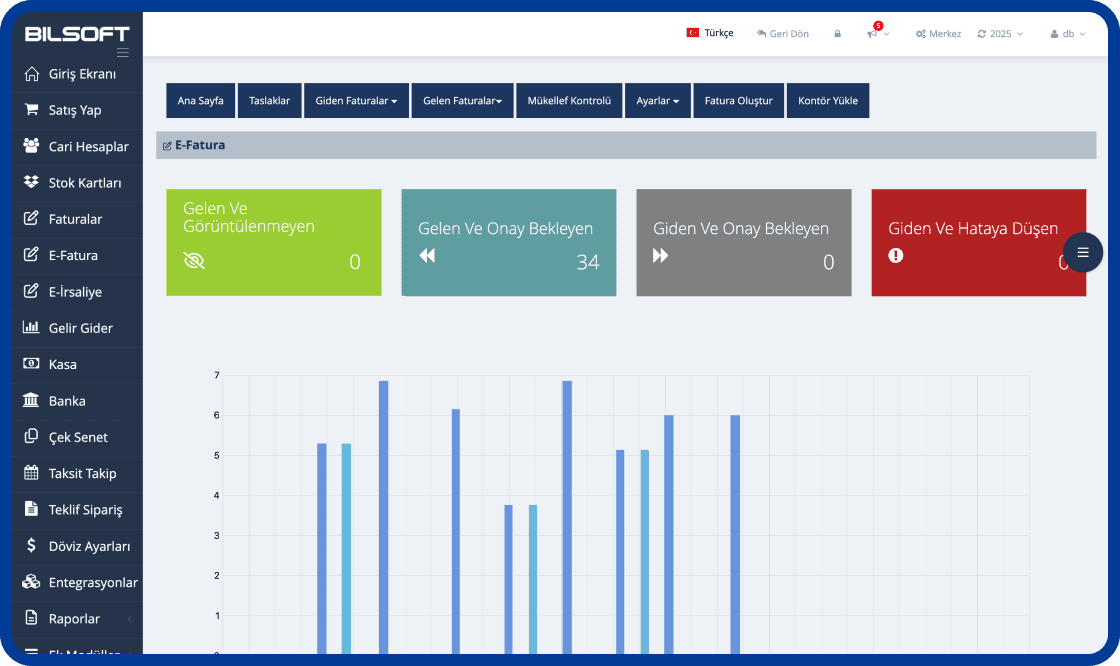
Bilsoft e-Arşiv Programı Arayüzü

Fortalecer los procesos de factura digital de su negocio

Gracias al programa Bilsoft E-Archivo, puede crear, almacenar y gestionar fácilmente sus facturas de forma segura en entorno digital. El sistema E-Archivo, compatible con GİB, cumple los requisitos legales, reduce los costes de transacción y hace sus procesos de facturación más eficientes.

e-Archive Invoice Creation

e-Archive Invoice Creation

  • Select customer and product details and create a GİB-compliant e-Archive invoice in a few steps.
Archivo

Archivo

  • Puede archivar de forma segura por un mínimo de 10 años.
Borrador de preparación

Borrador de preparación

  • Puede prepararse como borrador al igual que en los correos electrónicos.
Envío

Envío

  • Puede realizar sus operaciones de factura con la facilidad de recibir y enviar correos electrónicos.
Visualización e impresión

Visualización e impresión

  • Puede ver e imprimir a granel sin limitaciones de tiempo y espacio.
Módulo de cuenta corriente

Módulo de cuenta corriente

  • Definición de tarjeta de cuenta de cuenta corriente ilimitada
  • Definición de grupo ilimitada
  • Actual con acciones/ventas sin stock
  • Realizar el pago y el recaudación de la actualidad
Módulo de seguimiento de acciones

Módulo de seguimiento de acciones

  • Definición de almacén
  • Definición automática de código de barras para productos sin código de barras
  • Definición de tarjeta de stock
  • Definición automática de código de barras para productos ponderados
Sistema de informes

Sistema de informes

  • Estado de cuenta, informe actual a granel, etc. para las tarjetas actuales
  • Stock, movimientos de almacén, informe de listas de acciones, etc.
  • Informe de ventas y tabla de ventas
Módulo de factura

Módulo de factura

  • Edición de facturas de compra, ventas y devolución
  • Hacer ventas minoristas rápidas
  • Soporte de código de barras de producto estándar y ponderado
  • Convertir el envío a factura

What is an e-Archive Program?

An e-Archive program is e-Transformation software that helps businesses create e-Archive invoices electronically, deliver them to customers, view them and store them digitally. With the Bilsoft e-Archive Program, e-Archive processes are managed from a single panel and invoicing is tracked together with current accounts, stock and other accounting processes.

You can use it together with the Online Accounting Program to run e-Archive with your accounting, and the e-Invoice Program for customers who are e-Invoice taxpayers.

How Does the e-Archive Program Work?

In the Bilsoft e-Archive Program the invoice process is completed in six steps, all from a single panel without additional software.

  1. Entering Invoice Details

    Customer details, invoice date and product or service lines are entered. Saved account and stock cards fill in the details automatically.

  2. Creating the e-Archive Invoice

    A GİB-compliant e-Archive invoice is created with one click; VAT and totals are calculated automatically.

  3. Checking the Invoice

    Customer, amount and line details are reviewed on the preview screen before approval; the invoice can be saved as a draft.

  4. Sending It Digitally to the Customer

    The approved invoice is delivered to the customer by e-mail as a PDF and reported to GİB.

  5. Tracking the Invoice in the System

    Status, collection and account posting of sent invoices are monitored instantly in the program.

  6. Storing the e-Archive Invoice Digitally

    All invoices are archived electronically and can be viewed anytime by date, customer or invoice number.

How to Issue an e-Archive Invoice?

After entering customer and invoice details in the Bilsoft e-Archive Program, product or service lines are added. Details are checked, the e-Archive invoice is created and can be delivered to the customer electronically. Created invoices can later be viewed and tracked in the system.

Cancelling an e-Archive Invoice

According to GİB rules an e-Archive invoice can be cancelled within 8 days of its date; the cancellation is done in Bilsoft and reported to GİB. After that period a return invoice is issued. See our guide How to Cancel an e-Archive Invoice? for step-by-step instructions.

Who Can Use the e-Archive Program?

SMEs, sole proprietorships, e-commerce businesses, retail stores, service businesses and any business that wants to manage invoicing electronically can use the Bilsoft e-Archive Program. Depending on the business, e-Archive operations can be managed together with current accounts, stock, sales and other accounting processes.

SMEs and sole proprietorships

Small teams issue and archive their own invoices without accounting expertise.

E-commerce businesses

High-volume invoices to end consumers are generated automatically, integrated with order data.

Retail stores

e-Archive invoices are issued directly from the till together with barcode sales and stock tracking.

Service businesses

Consulting, service and maintenance invoices are e-mailed instantly and collections are tracked on the account.

What Is the Difference Between e-Archive and e-Invoice?

Both documents are issued electronically; the difference is who the recipient is and how the document is delivered. You can issue both from a single panel in Bilsoft.

Featuree-Archive Invoicee-Invoice
Scope of useInvoices issued to customers who are not e-Invoice taxpayers and to end consumersInvoices between companies that are e-Invoice taxpayers
RecipientIndividuals and businesses not registered in the GİB e-Invoice systemTaxpayers registered in the GİB e-Invoice system
Delivery processInvoice is e-mailed to the customer and reported to GİBInvoice is delivered to the recipient e-Invoice account via the GİB system
Invoice managementCancellation is done in the program within 8 days and reported to GİBAcceptance, rejection and objection are done by the recipient via GİB within 8 days
Using in BilsoftCreated, sent and archived from a single panel with the Bilsoft e-Archive ProgramManaged from the same panel; see the e-Invoice Program page for details

See our e-Invoice Program page for details.

Ventajas del sistema Bilsoft e-Arşiv que impulsan su empresa hacia el futuro

El programa Bilsoft e-Arşiv, que ofrece la posibilidad de crear, enviar y almacenar sus facturas digitalmente desde cualquier lugar con Internet, facilita los procesos contables de su empresa.

Fácil de usar y procesamiento rápidoFácil de usar y procesamiento rápido
Archivo seguro de 10 añosArchivo seguro de 10 años
Cumplimiento legal e integración de GiBCumplimiento legal e integración de GiB
Envío rápido con correo electrónicoEnvío rápido con correo electrónico
Ahorro de costos de papel e impresiónAhorro de costos de papel e impresión

What to Consider When Choosing an e-Archive Program?

An e-Archive program should do more than issue invoices; it should work with your e-Invoice, account, stock and accounting processes. We recommend evaluating the following criteria.

Ease of use

Creating, sending and archiving invoices should take a few steps without accounting expertise.

GİB compliance

The program must follow GİB technical standards, report invoices automatically and reflect regulatory updates.

e-Invoice integration

Issuing e-Invoices from the same panel for e-Invoice taxpayer customers removes the need for two programs.

Accounting integration

Invoices should post automatically to income-expense, cash and bank records without re-entry.

Current account tracking

Issued invoices should reflect in customer accounts with instant balances, statements and collections.

Stock management

Products on invoices should be deducted from stock automatically, with barcode and warehouse support.

Invoice archiving

Invoices must be stored on secure, redundant servers for the legal retention period with fast access.

Reporting features

Reports on issued and cancelled invoices, VAT, turnover and customers should be available in the program.

Mobile and web access

Invoices should be accessible from computer, tablet and phone without being tied to the office.

Technical support

A support team reachable by phone, live chat and remote connection is essential for outages or invoice errors.

API and integration options

E-commerce, marketplace, bank and cargo integrations plus open API support connect invoicing to your other systems.

Bilsoft e-Archive Program User Reviews

Serkan G.
Serkan G.

İçecek Toptancısı

Ayda yüzlerce fatura kesiyoruz ve bunları arşivlemek başlı başına bir işti. Bilsoft'un e-arşiv programı ile artık tüm faturalar güvenli şekilde sistemde saklanıyor. İstediğim zaman eski bir faturayı saniyeler içinde bulabiliyorum. İşimizi çok rahatlattı.

estrellaestrellaestrellaestrellaestrella
Fatma K.
Fatma K.

Tekstil Atölyesi

Müşterilere hem matbu hem dijital fatura gönderiyorduk ama eski faturalara ulaşmak çok zordu. Şimdi tüm e-arşivler sistemde kayıtlı, filtreleme özelliği sayesinde tarih, tutar veya müşteri adına göre kolayca erişiyoruz. Arşiv derdi bitti.

estrellaestrellaestrellaestrellaestrella
Muhammed Ali. K.
Muhammed Ali. K.

Makine Yedek Parça Satıcısı

Geçmiş yıllara ait faturaları klasör klasör saklamak zorundaydık. Şimdi her şey dijital, Bilsoft'un e-arşiv programı sayesinde GİB uyumlu bir şekilde geçmişe dönük tüm faturalara erişimimiz var. Ofisteki kağıt yükü ciddi oranda azaldı.

estrellaestrellaestrellaestrellaestrella

Preguntas frecuentes sobre e-Archivo

Obtenga más información sobre nuestra lista de preguntas frecuentes y comuníquese con nuestra atención al cliente si tiene algo que preguntar.

El programa Bilsoft E-Archive es adecuado para empresas de todos los tamaños, incluidas las compañías que no son contribuyentes de invocación electrónica.

El programa Bilsoft E-Archive funciona integrado con GiB (Administración de Ingresos). Gracias a esta integración, todas las facturas de Archive emitidas se informan a GiB. Por lo tanto, las operaciones de factura se vuelven completamente legales y cumplen con las regulaciones.

E-Invoice es un tipo de factura electrónica emitido entre dos contribuyentes de invocación electrónica y solo es válido entre los usuarios de invocación electrónica. La factura e-Archive es una factura electrónica emitida a personas e instituciones que no son contribuyentes de invocación electrónica.

El programa Bilsoft E-Archive puede funcionar compatible con dispositivos móviles. Gracias a su infraestructura basada en la web, el acceso se puede proporcionar desde cualquier lugar con conexión a Internet a través de teléfonos móviles, tabletas y computadoras portátiles.

¿Tienes alguna pregunta?

¡Estamos contigo cada momento!

No permita que su negocio se detenga, proporcionamos soluciones a todas sus preguntas. ¡Estamos aquí para obtener apoyo rápido y confiable!