
الأرشيف الإلكتروني
قم بإنشاء فواتيرك وتخزينها وإدارتها في البيئة الإلكترونية مع برنامج Bilsoft الأرشيف الإلكتروني.
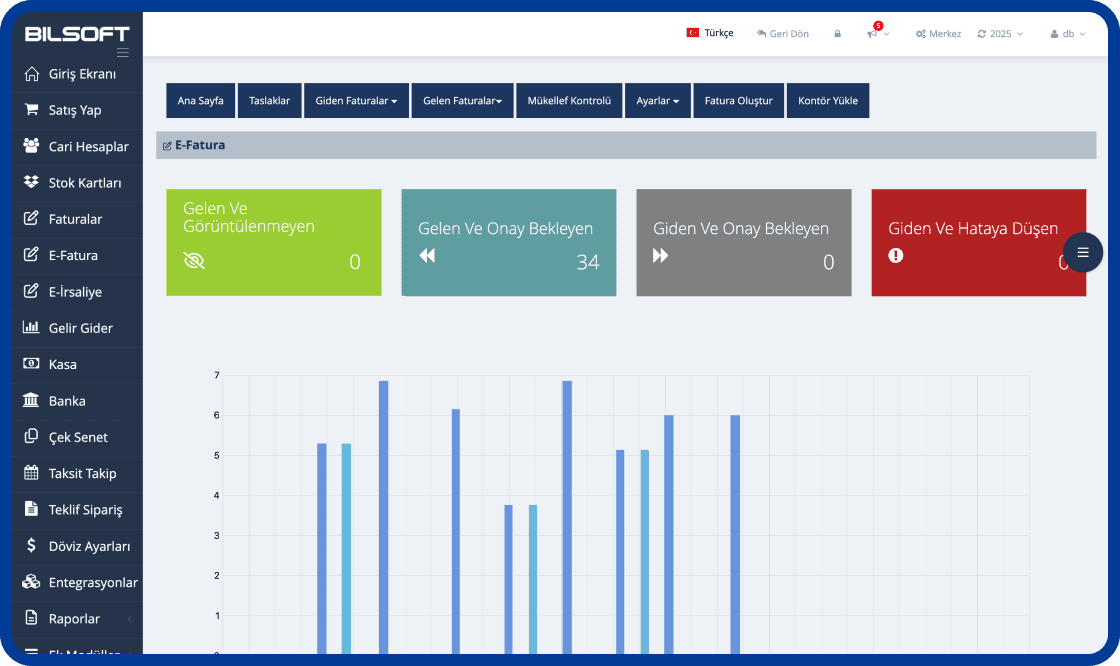
ميزات البرنامج الإلكترونية
يتيح لك برنامج Bilsoft الأرشيف الإلكتروني تنظيم فواتيرك في البيئة الرقمية وتخزينها بشكل آمن. مع توفير الامتثال الكامل للالتزامات القانونية مع البنية التحتية المتوافقة مع GiB ، فإنه يوفر الوقت ، ويقلل من تكاليف المعاملات ويسمح لك بسهولة بإدارة أرشيف الفاتورة الخاص بك.

أرشفة
- يمكنك الأرشفة بشكل آمن لمدة لا تقل عن 10 سنوات.
مشروع التحضير
- يمكنك الاستعداد كمشروع كما هو الحال في رسائل البريد الإلكتروني.
إرسال
- يمكنك تنفيذ عمليات الفاتورة الخاصة بك مع سهولة استلام وإرسال رسائل البريد الإلكتروني.
المشاهدة والطباعة
- يمكنك عرض والطباعة بكميات كبيرة بدون قيود على الوقت والمساحة.
وحدة الحساب الجاري
 تعريف بطاقة الحساب الجاري غير محدود
- تعريف المجموعة غير المحدود
- الحالي مع مبيعات الأسهم/غير المخزون
- إجراء الدفع والتحصيل إلى التيار
وحدة تتبع الأسهم
- تعريف المستودع
- تعريف الباركود التلقائي للمنتجات بدون باركود
- تعريف بطاقة الأسهم
- تعريف الباركود التلقائي للمنتجات المرجحة
نظام الإبلاغ
- بيان الحساب ، التقرير الحالي بالجملة وما إلى ذلك للبطاقات الحالية
- الأسهم ، حركات المستودعات ، تقرير قوائم الأسهم وما إلى ذلك.
- تقرير المبيعات ورسم البيع
وحدة الفاتورة
- شراء ومبيعات وإرجاع تحرير فاتورة
- جعل مبيعات التجزئة السريعة
- دعم الباركود المنتج القياسي والمرجح
- تحويل الإرسال إلى الفاتورة
مزايا البرنامج الإلكترونية التي تنقل عملك إلى المستقبل !!
يتيح برنامج Archive الأرشيف الإلكتروني ، الذي يوفر الفرصة لإنشاء فواتيرك وإرسالها وتخزينها رقميًا من أي مكان مع الإنترنت ، عمليات المحاسبة الخاصة بعملك.
 سهلة الاستخدام والمعالجة السريعة
 10 سنوات أرشفة آمنة
 الامتثال القانوني وتكامل GiB
 إرسال سريع باستخدام البريد الإلكتروني
 وفورات في تكاليف الورق والطباعة
İşini bilenlerden gelenler


İçecek Toptancısı
Ayda yüzlerce fatura kesiyoruz ve bunları arşivlemek başlı başına bir işti. Bilsoft'un e-arşiv programı ile artık tüm faturalar güvenli şekilde sistemde saklanıyor. İstediğim zaman eski bir faturayı saniyeler içinde bulabiliyorum. İşimizi çok rahatlattı.


Tekstil Atölyesi
Müşterilere hem matbu hem dijital fatura gönderiyorduk ama eski faturalara ulaşmak çok zordu. Şimdi tüm e-arşivler sistemde kayıtlı, filtreleme özelliği sayesinde tarih, tutar veya müşteri adına göre kolayca erişiyoruz. Arşiv derdi bitti.

Makine Yedek Parça Satıcısı
Geçmiş yıllara ait faturaları klasör klasör saklamak zorundaydık. Şimdi her şey dijital, Bilsoft'un e-arşiv programı sayesinde GİB uyumlu bir şekilde geçmişe dönük tüm faturalara erişimimiz var. Ofisteki kağıt yükü ciddi oranda azaldı.
الأسئلة الشائعة حول الأرشيف الإلكتروني
تعرف على المزيد حول قائمة الأسئلة التي يتم طرحها بشكل متكرر واتصل بدعم العملاء إذا كان لديك أي شيء لطرحه.
يعد برنامج Bilsoft الأرشيف الإلكتروني مناسبًا للشركات من جميع الأحجام ، بما في ذلك الشركات التي ليست دافعي الضرائب الإلكترونية.
يعمل برنامج Bilsoft الأرشيف الإلكتروني المدمج مع GiB (إدارة الإيرادات). بفضل هذا التكامل ، يتم الإبلاغ عن جميع الفواتير الإلكترونية الصادرة إلى GiB. وبالتالي ، تصبح عمليات الفاتورة قانونية ومتوافقة مع اللوائح.
الفاتورة الإلكترونية هو نوع فاتورة إلكتروني صدر بين دافعي الضرائب الفاتورة الإلكترونية وهو صالح فقط بين مستخدمي الفاتورة الإلكترونية. الفاتورة الإلكترونية هي فاتورة إلكترونية صادرة للأشخاص والمؤسسات التي ليست دافعي الضرائب الإلكترونية.
يمكن أن يعمل برنامج Bilsoft الأرشيف الإلكتروني مع الأجهزة المحمولة. بفضل البنية التحتية المستندة إلى الويب ، يمكن توفير الوصول من أي مكان مع الاتصال بالإنترنت عبر الهواتف المحمولة والأجهزة اللوحية وأجهزة الكمبيوتر المحمولة.
هل لديك سؤال؟
نحن معك كل لحظة!
لا تدع عملك يتوقف ، فنحن نقدم حلولًا لجميع أسئلتك. نحن هنا للحصول على دعم سريع وموثوق!