Электронный архив

С Bilsoft E-Archive вы можете создавать счета в электронной среде, надежно хранить и легко управлять ими. Цифровизируйте процессы E-Archive, чтобы экономить время и повышать операционную эффективность.

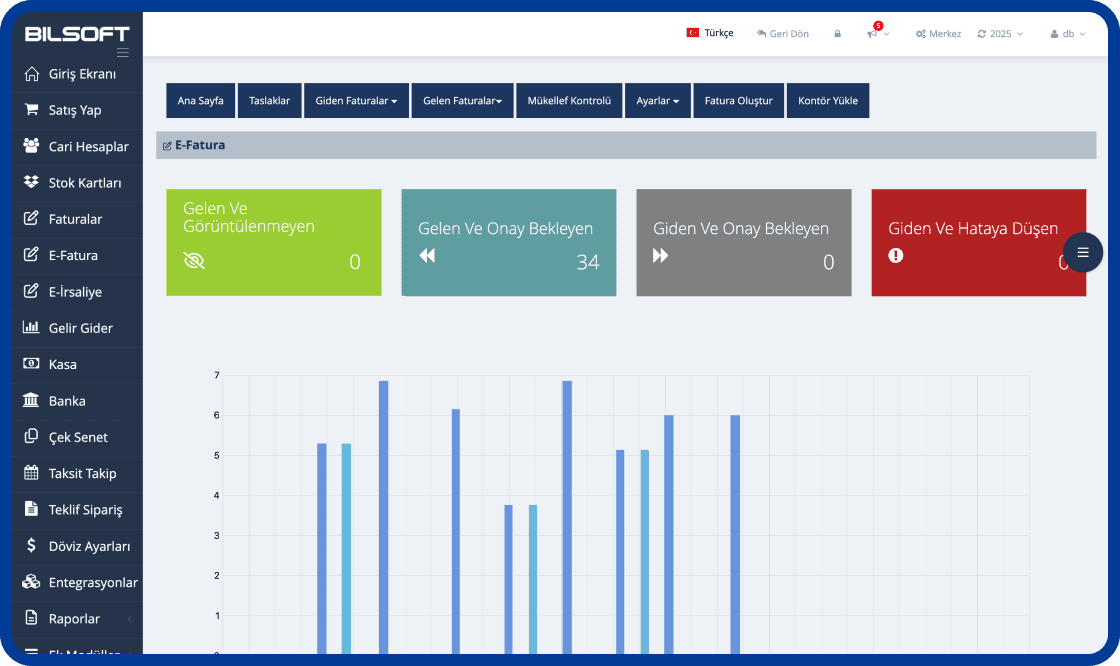
Bilsoft e-Arşiv Programı Arayüzü

Усилить процессы цифровых счетов вашего бизнеса

Благодаря программе Bilsoft E-Archive вы можете безопасно создавать, хранить и легко управлять счетами в цифровой среде. Система E-Archive с инфраструктурой, совместимой с GİB, соответствует законодательным требованиям, снижает транзакционные издержки и делает процессы выставления счетов более эффективными.

e-Archive Invoice Creation

e-Archive Invoice Creation

  • Select customer and product details and create a GİB-compliant e-Archive invoice in a few steps.
Архивирование

Архивирование

  • Вы можете надежно архивировать как минимум 10 лет.
Проект подготовки

Проект подготовки

  • Вы можете подготовиться в качестве черновика, как в электронных письмах.
Отправка

Отправка

  • Вы можете выполнить свои операции счетов с легкостью получения и отправки электронных писем.
Просмотр и печать

Просмотр и печать

  • Вы можете просмотреть и распечатать оптом без ограничений по времени и пространства.
Модуль текущей учетной записи

Модуль текущей учетной записи

  • Неограниченное определение карты текущей учетной записи
  • Неограниченное определение группы
  • Текущий с продажами акций/не нака
  • Платеж и сборы в текущий
Модуль отслеживания запасов

Модуль отслеживания запасов

  • Определение склада
  • Автоматическое определение штрих -кода для продуктов без штрих -кода
  • Определение карты фондовой карты
  • Автоматическое определение штрих -кода для взвешенных продуктов
Система отчетности

Система отчетности

  • Заявление аккаунта, объемный текущий отчет и т. Д. Для текущих карт
  • Акции, складские движения, отчет о списках акций и т. Д.
  • Отчет о продажах и диаграмма продаж
Модуль счетов

Модуль счетов

  • Покупка, продажа и возврат счетов по редактированию
  • Быстрое розничное продажи
  • Стандартная и взвешенная поддержка штрих -кода продукта
  • Преобразование отправки в счет -фактуру

What is an e-Archive Program?

An e-Archive program is e-Transformation software that helps businesses create e-Archive invoices electronically, deliver them to customers, view them and store them digitally. With the Bilsoft e-Archive Program, e-Archive processes are managed from a single panel and invoicing is tracked together with current accounts, stock and other accounting processes.

You can use it together with the Online Accounting Program to run e-Archive with your accounting, and the e-Invoice Program for customers who are e-Invoice taxpayers.

How Does the e-Archive Program Work?

In the Bilsoft e-Archive Program the invoice process is completed in six steps, all from a single panel without additional software.

  1. Entering Invoice Details

    Customer details, invoice date and product or service lines are entered. Saved account and stock cards fill in the details automatically.

  2. Creating the e-Archive Invoice

    A GİB-compliant e-Archive invoice is created with one click; VAT and totals are calculated automatically.

  3. Checking the Invoice

    Customer, amount and line details are reviewed on the preview screen before approval; the invoice can be saved as a draft.

  4. Sending It Digitally to the Customer

    The approved invoice is delivered to the customer by e-mail as a PDF and reported to GİB.

  5. Tracking the Invoice in the System

    Status, collection and account posting of sent invoices are monitored instantly in the program.

  6. Storing the e-Archive Invoice Digitally

    All invoices are archived electronically and can be viewed anytime by date, customer or invoice number.

How to Issue an e-Archive Invoice?

After entering customer and invoice details in the Bilsoft e-Archive Program, product or service lines are added. Details are checked, the e-Archive invoice is created and can be delivered to the customer electronically. Created invoices can later be viewed and tracked in the system.

Cancelling an e-Archive Invoice

According to GİB rules an e-Archive invoice can be cancelled within 8 days of its date; the cancellation is done in Bilsoft and reported to GİB. After that period a return invoice is issued. See our guide How to Cancel an e-Archive Invoice? for step-by-step instructions.

Who Can Use the e-Archive Program?

SMEs, sole proprietorships, e-commerce businesses, retail stores, service businesses and any business that wants to manage invoicing electronically can use the Bilsoft e-Archive Program. Depending on the business, e-Archive operations can be managed together with current accounts, stock, sales and other accounting processes.

SMEs and sole proprietorships

Small teams issue and archive their own invoices without accounting expertise.

E-commerce businesses

High-volume invoices to end consumers are generated automatically, integrated with order data.

Retail stores

e-Archive invoices are issued directly from the till together with barcode sales and stock tracking.

Service businesses

Consulting, service and maintenance invoices are e-mailed instantly and collections are tracked on the account.

What Is the Difference Between e-Archive and e-Invoice?

Both documents are issued electronically; the difference is who the recipient is and how the document is delivered. You can issue both from a single panel in Bilsoft.

Featuree-Archive Invoicee-Invoice
Scope of useInvoices issued to customers who are not e-Invoice taxpayers and to end consumersInvoices between companies that are e-Invoice taxpayers
RecipientIndividuals and businesses not registered in the GİB e-Invoice systemTaxpayers registered in the GİB e-Invoice system
Delivery processInvoice is e-mailed to the customer and reported to GİBInvoice is delivered to the recipient e-Invoice account via the GİB system
Invoice managementCancellation is done in the program within 8 days and reported to GİBAcceptance, rejection and objection are done by the recipient via GİB within 8 days
Using in BilsoftCreated, sent and archived from a single panel with the Bilsoft e-Archive ProgramManaged from the same panel; see the e-Invoice Program page for details

See our e-Invoice Program page for details.

Преимущества системы Bilsoft e-Arşiv, которые ведут ваш бизнес в будущее

Программа Bilsoft e-Arşiv, которая предлагает возможность создавать, отправлять и хранить счета в цифровом виде из любого места с интернетом, упрощает бухгалтерские процессы вашего бизнеса.

Простое использование и быстрая обработкаПростое использование и быстрая обработка
10 лет безопасного архивирования10 лет безопасного архивирования
Юридическое соблюдение и интеграция GiBЮридическое соблюдение и интеграция GiB
Быстрая отправка по электронной почтеБыстрая отправка по электронной почте
Экономия стоимости бумаги и печатиЭкономия стоимости бумаги и печати

What to Consider When Choosing an e-Archive Program?

An e-Archive program should do more than issue invoices; it should work with your e-Invoice, account, stock and accounting processes. We recommend evaluating the following criteria.

Ease of use

Creating, sending and archiving invoices should take a few steps without accounting expertise.

GİB compliance

The program must follow GİB technical standards, report invoices automatically and reflect regulatory updates.

e-Invoice integration

Issuing e-Invoices from the same panel for e-Invoice taxpayer customers removes the need for two programs.

Accounting integration

Invoices should post automatically to income-expense, cash and bank records without re-entry.

Current account tracking

Issued invoices should reflect in customer accounts with instant balances, statements and collections.

Stock management

Products on invoices should be deducted from stock automatically, with barcode and warehouse support.

Invoice archiving

Invoices must be stored on secure, redundant servers for the legal retention period with fast access.

Reporting features

Reports on issued and cancelled invoices, VAT, turnover and customers should be available in the program.

Mobile and web access

Invoices should be accessible from computer, tablet and phone without being tied to the office.

Technical support

A support team reachable by phone, live chat and remote connection is essential for outages or invoice errors.

API and integration options

E-commerce, marketplace, bank and cargo integrations plus open API support connect invoicing to your other systems.

Bilsoft e-Archive Program User Reviews

Serkan G.
Serkan G.

İçecek Toptancısı

Ayda yüzlerce fatura kesiyoruz ve bunları arşivlemek başlı başına bir işti. Bilsoft'un e-arşiv programı ile artık tüm faturalar güvenli şekilde sistemde saklanıyor. İstediğim zaman eski bir faturayı saniyeler içinde bulabiliyorum. İşimizi çok rahatlattı.

звездазвездазвездазвездазвезда
Fatma K.
Fatma K.

Tekstil Atölyesi

Müşterilere hem matbu hem dijital fatura gönderiyorduk ama eski faturalara ulaşmak çok zordu. Şimdi tüm e-arşivler sistemde kayıtlı, filtreleme özelliği sayesinde tarih, tutar veya müşteri adına göre kolayca erişiyoruz. Arşiv derdi bitti.

звездазвездазвездазвездазвезда
Muhammed Ali. K.
Muhammed Ali. K.

Makine Yedek Parça Satıcısı

Geçmiş yıllara ait faturaları klasör klasör saklamak zorundaydık. Şimdi her şey dijital, Bilsoft'un e-arşiv programı sayesinde GİB uyumlu bir şekilde geçmişe dönük tüm faturalara erişimimiz var. Ofisteki kağıt yükü ciddi oranda azaldı.

звездазвездазвездазвездазвезда

Часто задаваемые вопросы о e-Архиве

Узнайте больше о нашем списке часто задаваемых вопросов и свяжитесь с нашей поддержкой клиентов, если вам есть что спросить.

Программа E-Archive Bilsoft подходит для предприятий всех размеров, включая компании, которые не являются налогоплательщиками Электронный счет-фактура.

Программа E-Archive Bilsoft работает интегрирована с GiB (администрирование доходов). Благодаря этой интеграции все выпущенные счета-фактуры электронных архив представлены в GiB. Таким образом, операции счетов становятся полностью законными и соответствуют правилам.

Электронный счет-фактура-это электронный тип счета-фактуры, выпущенный между двумя налогоплательщиками Электронный счет-фактура, и действует только между пользователями Электронный счет-фактура. Электронный счет-фактура-это электронный счет, выданный лицам и учреждениям, которые не являются налогоплательщиками Электронный счет-фактура.

Программа E-Archive Bilsoft может работать совместимой с мобильными устройствами. Благодаря своей веб-инфраструктуре доступ может быть предоставлен из любого места с подключением к Интернету через мобильные телефоны, планшеты и ноутбуки.

У вас есть вопрос?

Мы с тобой каждый момент!

Не позволяйте вашему бизнесу остановиться, мы предоставляем решения для всех ваших вопросов. Мы здесь для быстрой и надежной поддержки!